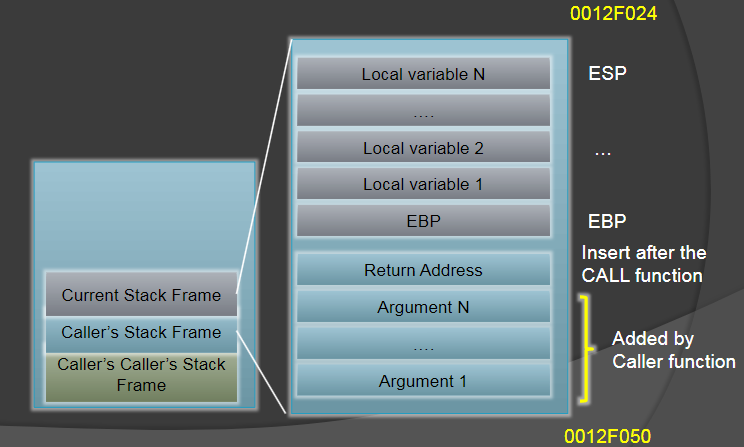
MRE
Use Little Endian
For more accurate answers use IDA PRO
Artihmetic Instructions
- ADD
- Add source to dest. Example:
- MOV EAX, 3
- MOV EBX, 2
- ADD EAX, EBX
- EAX = 5
- Add source to dest. Example:
- SUB
- Subtracts source from dest. Example:
- MOV EAX, 3
- MOV EBX, 2
- SUB EAX, EBX
- EAX = 1
- Subtracts source from dest. Example:
- INC
- Increments the destination by 1. Example:
- MOV EAX, 3
- INC EAX
- EAX = 4
- Increments the destination by 1. Example:
- DEC
- decrements the destination by 1. Example:
- MOV EAX, 3
- DEC EAX
- EAX = 2
- decrements the destination by 1. Example:
- MUL
- Multiples with operand results to store at EAX:EDX. Example:
- MOV EAX, 3
- MOV EBX, 2
- MUL EBX
- EAX:EBX = 6
- Multiples with operand results to store at EAX:EDX. Example:
- DIV
- Divides register with operand the results. Example:
- MOV EAX, 32771
- MOV EBX, 256
- DIV EBX
- EDX = 3 (Remainder) , EAX 128
- Divides register with operand the results. Example:
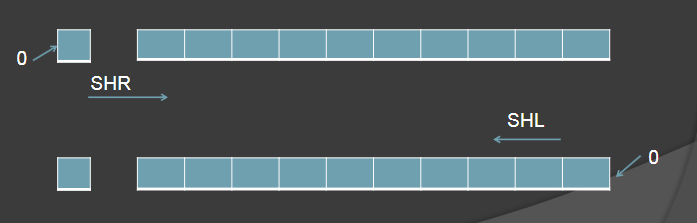
- SHL/SHR (Shifting Left/Shifting Right)
- Shifts the destination to the left or right by filling with 0
- SHL/SHR dest, src
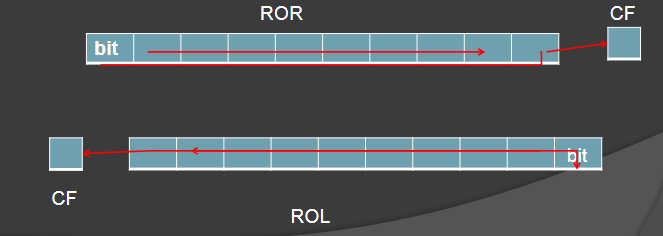
- ROL/ROR (Rotate Left/Rotate Right)
- ROR — Right most bit move to left most bit + into the CF flag
- ROL — Left most bit move to the right most bit + into the CF flag
Boolean Instructions
- OR
- EAX = 1001
- EBX = 0110
- OR EAX, EBX
- EAX = 1111, EBX = 0110
- NEG
- NEG EAX, 0101
- EAX = 1010
- TEST
- Does AND operation and changes flag (no change for source and dest)
- AND
- EAX = 1011
- EBX = 1101
- AND EAX, EBX
- EAX = 1001, EBX = 1101
- NOT
- XOR
- EAX = 1111 0000 0000 1111
- EBX = 0000 0000 0001 1111
- XOR EAX, EBX
- EAX = 1111 0000 0001 0000
- CMP
- Does subtraction opereation and changes flag (no change for source and dest)
Flags
- Zero flag (Z)
- -----z--- - Zero flag
- Overflow flag (O)
- o-------- - Overflow flag
- Carry flag (C)
- --------c - Carry flag
- Sign flag (S)
- ----s---- - Sign flag
- Parity flag (P)
- -------p- - Parity flag
Control Instructions
- LEA
- JMP
- LOOP
- PUSH
- POP
- CALL
- RETN
- REP
- REPXX
- SCAS
- NOP
- JXX
- General
- JE
- JZ
- JC
- JCXZ
- JP
- JMP
- JECXZ
- JNC
- JNZ
- JNE
- Unsigned comparison jump
- JA
- JNBE
- JAE
- JNB
- JB
- JNAE
- JBE
- JNA
- Signed comparison jumps
- JG
- JNLE
- JGE
- JNL
- JL
- JNGE
- JNG
- JLE
- JS
- JNS
- JO
- JNO
- General
General use
C# decompilers
- ILSpy
- dotPeek
Do not forget to drag the DLL files
ollydbg
- To view memory map click on

- To vire content of the PE headers double click PE header
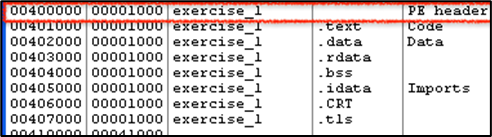
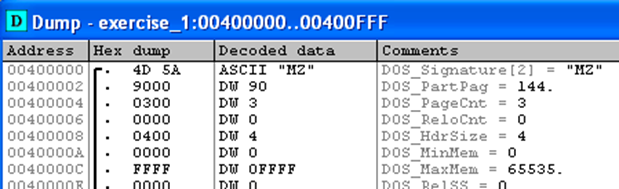
- Something similar should show up
- To jump to a certain address press Ctrl + G or right click in the dump and select the following
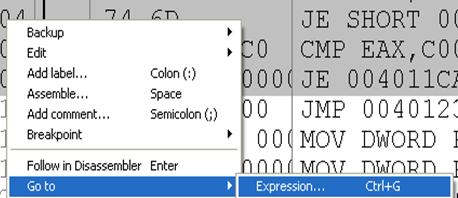
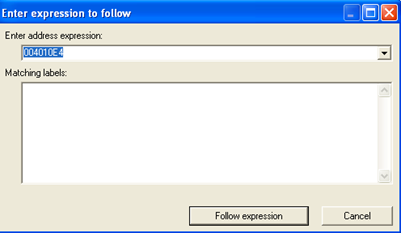
- To view registers and flags click on view → CPU or (Alt + C)
- To set breakpoints press F2 or right click on where uw set the breakpoint → breakpoint → toggle
- click on play button to start debugging

- For line by line debugging press F7
- To execute until return go to Debug → Execute until return
- Press F9 to run application through
- To restart application press Ctrl + F2
- To view memory map click on
IDA Pro
To set breakpoint press F2
To stepover press F8
To change inbetween code block and regular view press spacebar
To jump to stored value double click the value

Binary Patching
Ollydby
To patch a program double click an instruction you would like to patch, a window should open
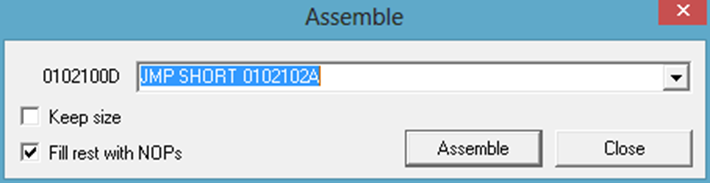
- To save right click on the list of code and click save file
- Click yes and provide the file name

IDA Pro
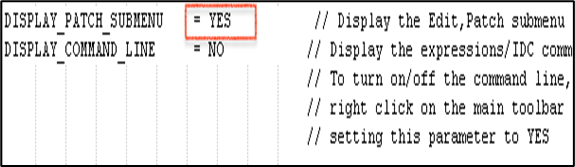
edit idagui.cfg with notepad at C:\Program Files\IDA Free\cfg\idagui.cfg, restart IDA once done
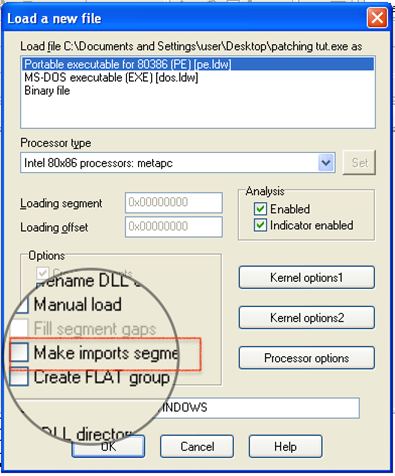
Uncheck make import segment
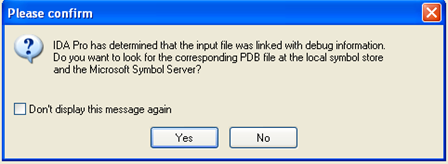
Click no when prompted
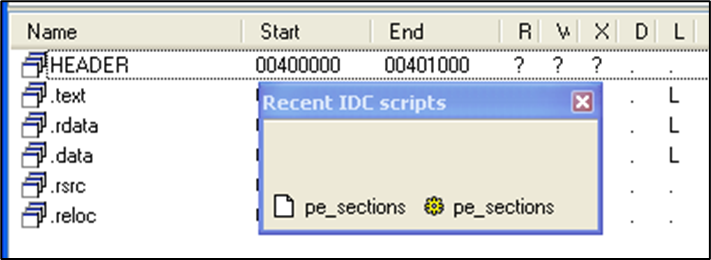
Select view → open submenu → segments to see imported segments

To import scripts to IDA pro go to select → IDC files → <script> then click open (Scripts are normally at C:\Program Files\IDA free\idc
To edit the line u would like to and select Edit → Patch Program → Assemble
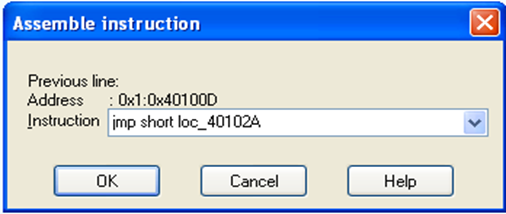
To patch binary select Edit → Patch program → change byte
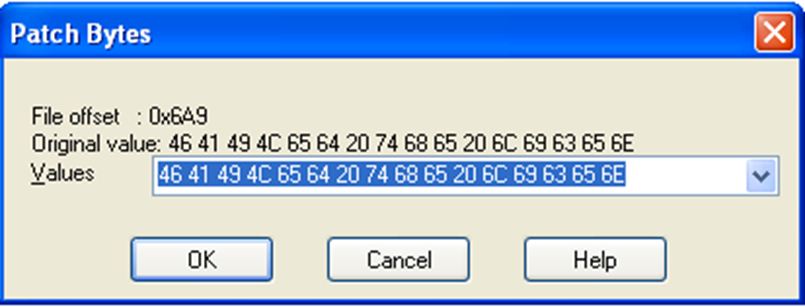
To save the patched binary select File → IDC Files → pe_write.idc then click on open
Anti Disassembly
- use CFF explorer and check section headers
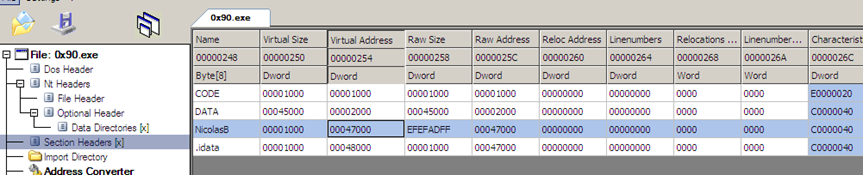
As you can see the virtual size is bigger than the Raw Size we can don’t load that portion of the application in IDA pro by checking the following.
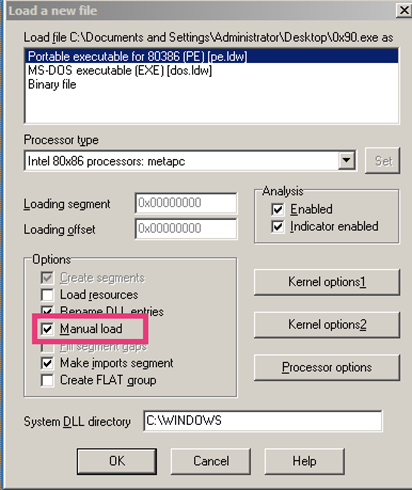
or we can change the raw size of the portion with its virtual size
- if the above doesn’t work try this instead
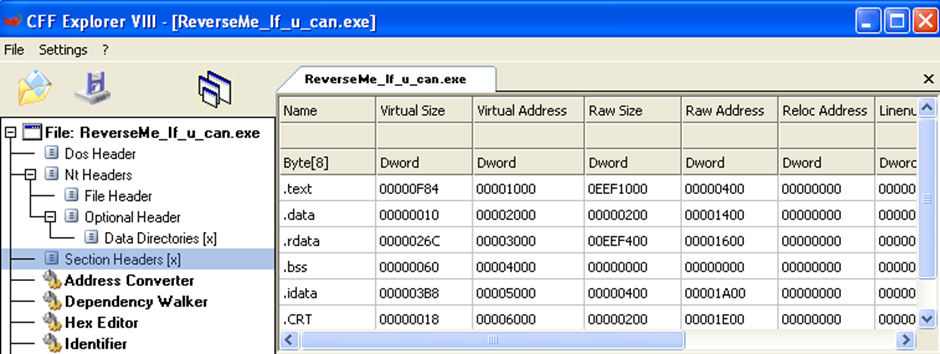
As the second portion of the header address is at 1400 and the first header address is at 400 we can deduce that the header size is 1000
- if the above doesn’t work try this instead
ASCII table (for easy access)
| Dec | Hex | Char |
| 0 | 00 | NUL |
| 1 | 01 | SOH |
| 2 | 02 | STX |
| 3 | 03 | ETX |
| 4 | 04 | EOT |
| 5 | 05 | ENQ |
| 6 | 06 | ACK |
| 7 | 07 | BEL |
| 8 | 08 | BS |
| 9 | 09 | HT |
| 10 | 0A | LF |
| 11 | 0B | VT |
| 12 | 0C | FF |
| 13 | 0D | CR |
| 14 | 0E | SO |
| 15 | 0F | SI |
| 16 | 10 | DLE |
| 17 | 11 | DC1 |
| 18 | 12 | DC2 |
| 19 | 13 | DC3 |
| 20 | 14 | DC4 |
| 21 | 15 | NAK |
| 22 | 16 | SYN |
| 23 | 17 | ETB |
| 24 | 18 | CAN |
| 25 | 19 | EM |
| 26 | 1A | SUB |
| 27 | 1B | ESC |
| 28 | 1C | FS |
| 29 | 1D | GS |
| 30 | 1E | RS |
| 31 | 1F | US |
| 32 | 20 | space |
| 33 | 21 | ! |
| 34 | 22 | " |
| 35 | 23 | # |
| 36 | 24 | $ |
| 37 | 25 | % |
| 38 | 26 | & |
| 39 | 27 | ' |
| 40 | 28 | ( |
| 41 | 29 | ) |
| 42 | 2A | * |
| 43 | 2B | + |
| 44 | 2C | , |
| 45 | 2D | - |
| 46 | 2E | . |
| 47 | 2F | / |
| 48 | 30 | 0 |
| 49 | 31 | 1 |
| 50 | 32 | 2 |
| 51 | 33 | 3 |
| 52 | 34 | 4 |
| 53 | 35 | 5 |
| 54 | 36 | 6 |
| 55 | 37 | 7 |
| 56 | 38 | 8 |
| 57 | 39 | 9 |
| 58 | 3A | : |
| 59 | 3B | ; |
| 60 | 3C | < |
| 61 | 3D | = |
| 62 | 3E | > |
| 63 | 3F | ? |
| 64 | 40 | @ |
| 65 | 41 | A |
| 66 | 42 | B |
| 67 | 43 | C |
| 68 | 44 | D |
| 69 | 45 | E |
| 70 | 46 | F |
| 71 | 47 | G |
| 72 | 48 | H |
| 73 | 49 | I |
| 74 | 4A | J |
| 75 | 4B | K |
| 76 | 4C | L |
| 77 | 4D | M |
| 78 | 4E | N |
| 79 | 4F | O |
| 80 | 50 | P |
| 81 | 51 | Q |
| 82 | 52 | R |
| 83 | 53 | S |
| 84 | 54 | T |
| 85 | 55 | U |
| 86 | 56 | V |
| 87 | 57 | W |
| 88 | 58 | X |
| 89 | 59 | Y |
| 90 | 5A | Z |
| 91 | 5B | [ |
| 92 | 5C | \ |
| 93 | 5D | ] |
| 94 | 5E | ^ |
| 95 | 5F | _ |
| 96 | 60 | ` |
| 97 | 61 | a |
| 98 | 62 | b |
| 99 | 63 | c |
| 100 | 64 | d |
| 101 | 65 | e |
| 102 | 66 | f |
| 103 | 67 | g |
| 104 | 68 | h |
| 105 | 69 | i |
| 106 | 6A | j |
| 107 | 6B | k |
| 108 | 6C | l |
| 109 | 6D | m |
| 110 | 6E | n |
| 111 | 6F | o |
| 112 | 70 | p |
| 113 | 71 | q |
| 114 | 72 | r |
| 115 | 73 | s |
| 116 | 74 | t |
| 117 | 75 | u |
| 118 | 76 | v |
| 119 | 77 | w |
| 120 | 78 | x |
| 121 | 79 | y |
| 122 | 7A | z |
| 123 | 7B | { |
| 124 | 7C | | |
| 125 | 7D | } |
| 126 | 7E | ~ |
| 127 | 7F | DEL |
Useful websites
Data Structures
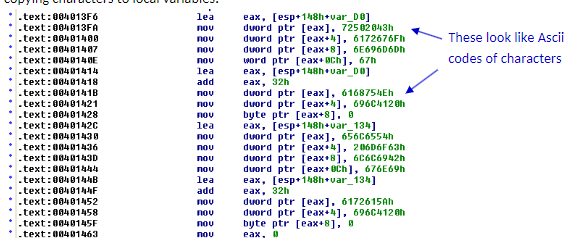
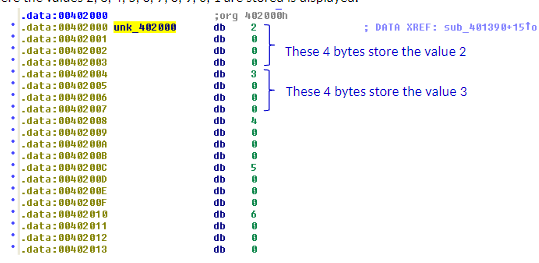
How to identify arrays in IDA pro?
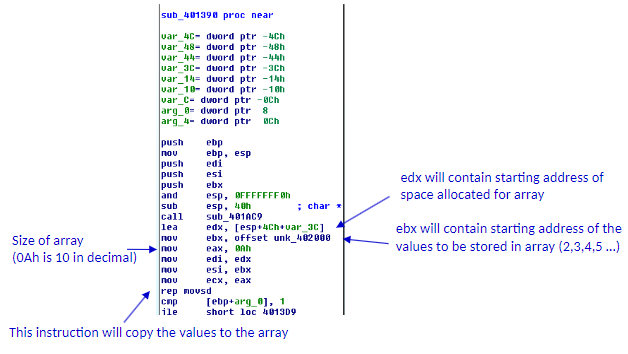
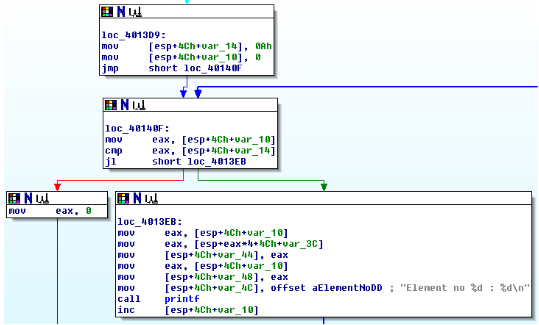
How to identify for loops in IDA pro?
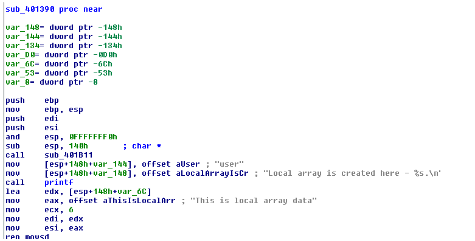
How to identify local array in IDA pro?

How to view data stored in array in IDA pro?
Stack Layout